What’s New: Faster Workflows, Better Visibility, Smarter Pricing
We’re excited to roll out a new set of enhancements designed to streamline order creation, improve project visibility, and make pricing and reporting more intuitive for everyone involved. These updates focus on saving time, reducing manual effort, and giving teams and customers clearer, real-time insights across the lifecycle of a job.
Duplicate Purchase Orders from Quick Order
Users can now duplicate an existing purchase order directly from the Quick Order workflow. This makes it faster and more accurate to create new hauls that closely resemble past jobs—eliminating repetitive data entry and helping ensure consistency across orders. Learn how to Duplicate a Purchase Order from a Quick Order.
Create Project Geofences During Proposal Creation
When creating or editing a proposal, users now have access to an interactive map to define the project location and geofence upfront. Project locations can be set using coordinates, a street address, or by manually dropping a pin. Users can also draw a custom project geofence at this stage, with a default 200-meter radius applied if none is specified—making project setup more precise from the start.
Display a Delivered Rate on Proposal PDFs
Proposals can now be configured to show a single “delivered rate” on the PDF. This delivered rate aggregates material costs, freight rates, and all associated fees into one clear price, making proposals easier to understand and simplifying conversations around pricing. 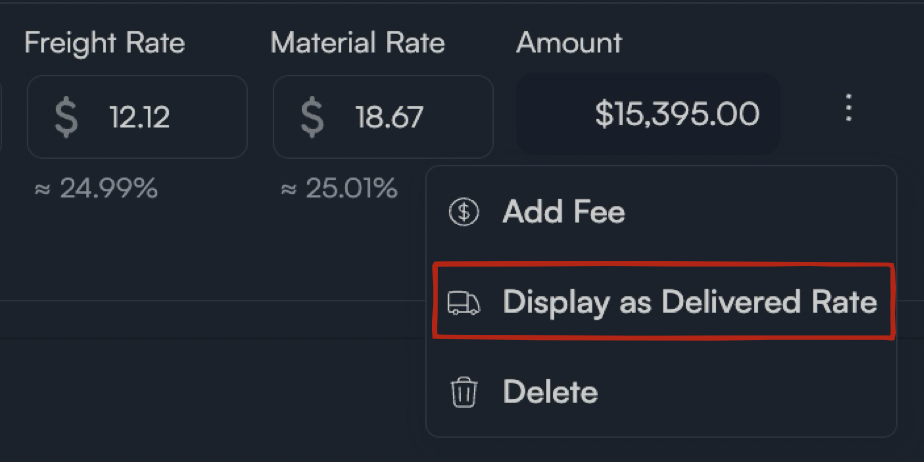
Load Tally in the Driver App
Drivers assigned to onsite or hourly jobs can now track the number of loads they move directly within the Driver App. This load tally provides customers with increased visibility into onsite production and progress, helping align expectations and improve transparency during active jobs. Learn how Drivers see Onsite Job on NM App
Review Status Filter on the Project Load Report
A new filter allows users to view loads in the Project Load Report based on their review status. This gives teams real-time insight into completed loads without waiting for tickets to fully clear the validation process—making it easier to monitor progress and address issues sooner.
✅ Wrapping Up...
These updates are all about reducing friction, increasing clarity, and giving teams better tools to work efficiently and confidently. As always, we’re continuing to listen closely to feedback and evolve the platform to support your day-to-day workflows—more improvements coming soon!
Was this article helpful?
That’s Great!
Thank you for your feedback
Sorry! We couldn't be helpful
Thank you for your feedback
Feedback sent
We appreciate your effort and will try to fix the article